gdb工具可以调试RTEMS操作系统,本文介绍如何使用gdb开展调试
一、设置saft-path
总共三种方法设置safe-path,分别如下
1.1 指定路径
我们可以设置自己想要的路径作为saft-path,如下
# vim ~/.gdbinit
add-auto-load-safe-path /home/user
1.2 设置所有的路径
也可也将所有路径作为saft-path,如下
# vim ~/.gdbinit
set auto-load safe-path /
1.3 启动参数设置
可以通过启动参数来设置,如下
# aarch64-rtems6-gdb -iex "set auto-load safe-path /" build/aarch64/zynqmp_qemu/testsuites/samples/ticker.exe
二、运行RTEMS
我们可以通过-s来运行RTEMS,这样默认情况下,qemu会启动gdb,远程可以连接RTEMS来进行调试,如下
# qemu-system-aarch64 -no-reboot -nographic -s -serial mon:stdio -machine xlnx-zcu102 -m 4096 -kernel build/aarch64/zynqmp_qemu/testsuites/samples/ticker.exe
三、gdb连接
在qemu启动rtems之后,可以通过127.0.0.1连接,如下
# aarch64-rtems6-gdb build/aarch64/zynqmp_qemu/testsuites/samples/ticker.exe
# target extended-remote 127.0.0.1:1234
当连接成功之后,出现如下信息
Remote debugging using 127.0.0.1:1234
_CPU_Thread_Idle_body (ignored=0) at ../../../cpukit/score/cpu/aarch64/aarch64-thread-idle.c:46
46        while ( true ) {
(gdb) bt
#0  _CPU_Thread_Idle_body (ignored=0) at ../../../cpukit/score/cpu/aarch64/aarch64-thread-idle.c:46
#1  0x000000000001edd0 in _Thread_Handler () at ../../../cpukit/score/src/threadhandler.c:164
#2  0x000000000001ece0 in ?? ()
至此,gdb远程加载成功
四、设置pretty-printing
为了支持pretty-printing,可以导出.debug信息如下
# aarch64-rtems6-objdump -s -j .debug_gdb_scripts build/aarch64/zynqmp_qemu/testsuites/samples/ticke
r.exe

build/aarch64/zynqmp_qemu/testsuites/samples/ticker.exe:     file format elf64-littleaarch64

Contents of section .debug_gdb_scripts:
 0000 04676462 2e696e6c 696e6564 2d736372  .gdb.inlined-scr
 0010 6970740a 696d706f 72742073 79730a69  ipt.import sys.i
 0020 6d706f72 74206f73 2e706174 680a7379  mport os.path.sy
 0030 732e7061 74682e61 7070656e 64286f73  s.path.append(os
 0040 2e706174 682e6a6f 696e2867 64622e50  .path.join(gdb.P
 0050 5954484f 4e444952 2c202772 74656d73  YTHONDIR, 'rtems
 0060 2729290a 696d706f 72742072 74656d73  ')).import rtems
 0070 2e707072 696e7465 72206173 20707072  .pprinter as ppr
 0080 696e7465 720a00                      inter..
然后通过pprint.py来加载,如下即可
(gdb) source ../out/share/gdb/python/rtems/pprinter.py
DeepSeek-R1 是由杭州深度求索公司开发, 该模型完全开源了所有训练技术和模型权重,性能对齐闭源的 OpenAI-o1, deepseek 通过 DeepSeek-R1 的输出,蒸馏了 6 个小模型给开源社区,包括 Qwen2.5 和 Llama3.1。 本文档将讲述如何使用 RKLLM 将 DeepSeek-R1 蒸馏模型 DeepSeek-R1-Distill-Qwen-1.5B 大语言模型部署到 RK3588 上利用 NPU 进行硬件加速推理。本文介绍DeepSeek-R1在麒麟系统上的部署步骤
一、下载链接
为了支持RK3588上升级DeepSeek,需要如下下载安装包。
git clone https://www.modelscope.cn/radxa/DeepSeek-R1-Distill-Qwen-1.5B_RKLLM.git
通过克隆之后,获得如下文件列表
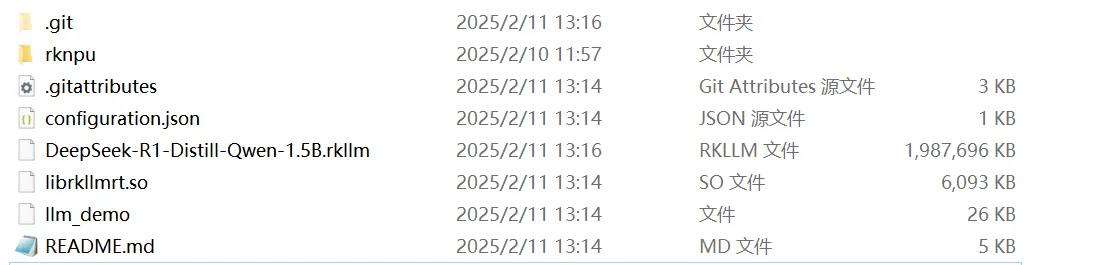
此时我们将安装包文件放置到RK3588的麒麟操作系统上
二、安装DeepSeek
安装DeepSeek非常简单,如下:
export LD_LIBRARY_PATH=$LD_LIBRARY_PATH:~/DeepSeek-R1-Distill-Qwen-1.5B_RKLLM
cd ~/DeepSeek-R1-Distill-Qwen-1.5B_RKLLM
chmod +x llm_demo
三、使用DeepSeek
使用DeepSeek仅需运行如下命令即可:
./llm_demo DeepSeek-R1-Distill-Qwen-1.5B.rkllm 10000 10000
然后我们得到如下信息:
rkllm init start
I rkllm: rkllm-runtime version: 1.1.4, rknpu driver version: 0.9.3, platform: RK3588
rkllm init success
user:
至此我们可以开始使用DeepSeek
例如询问斐波那契数列如下:
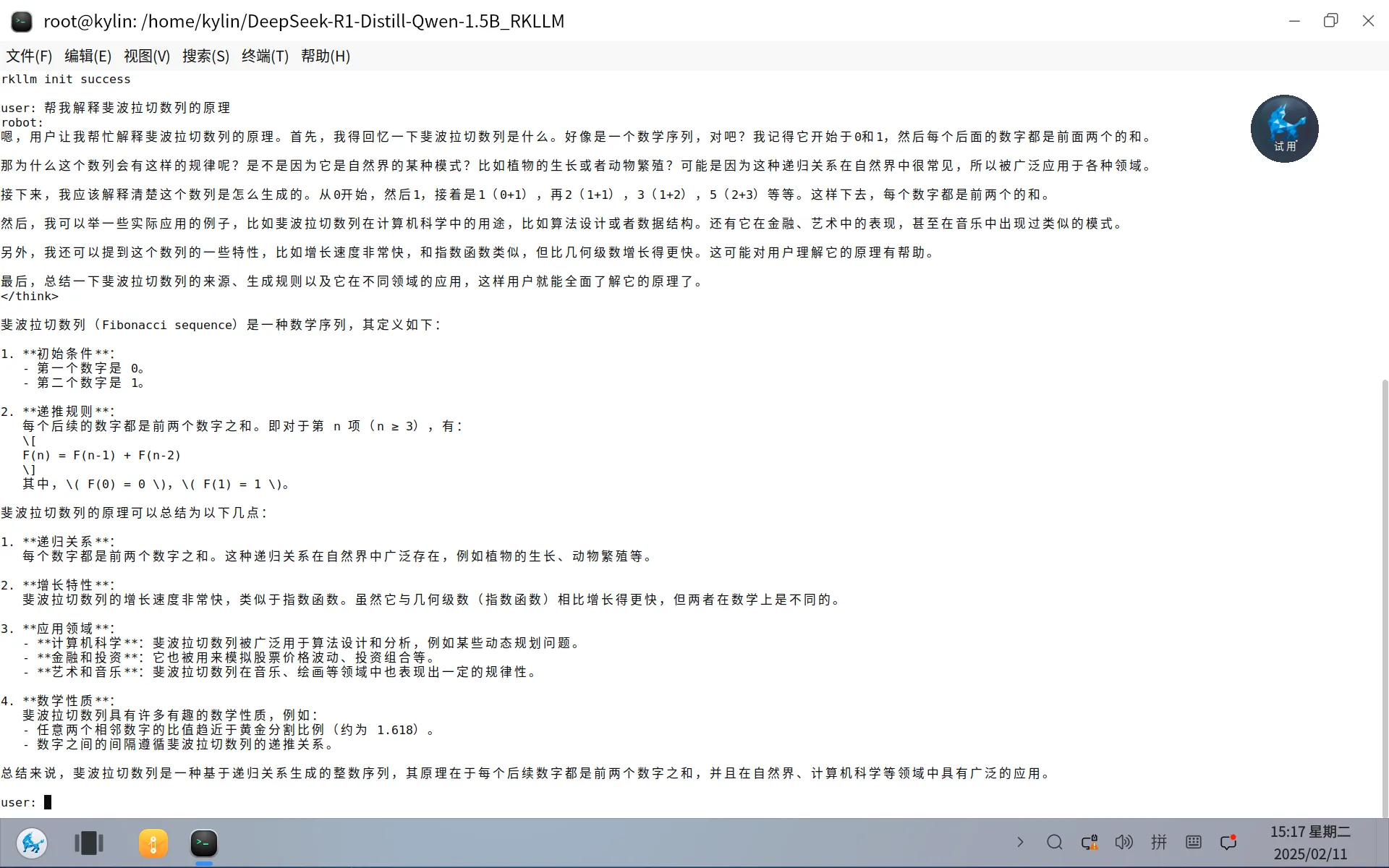
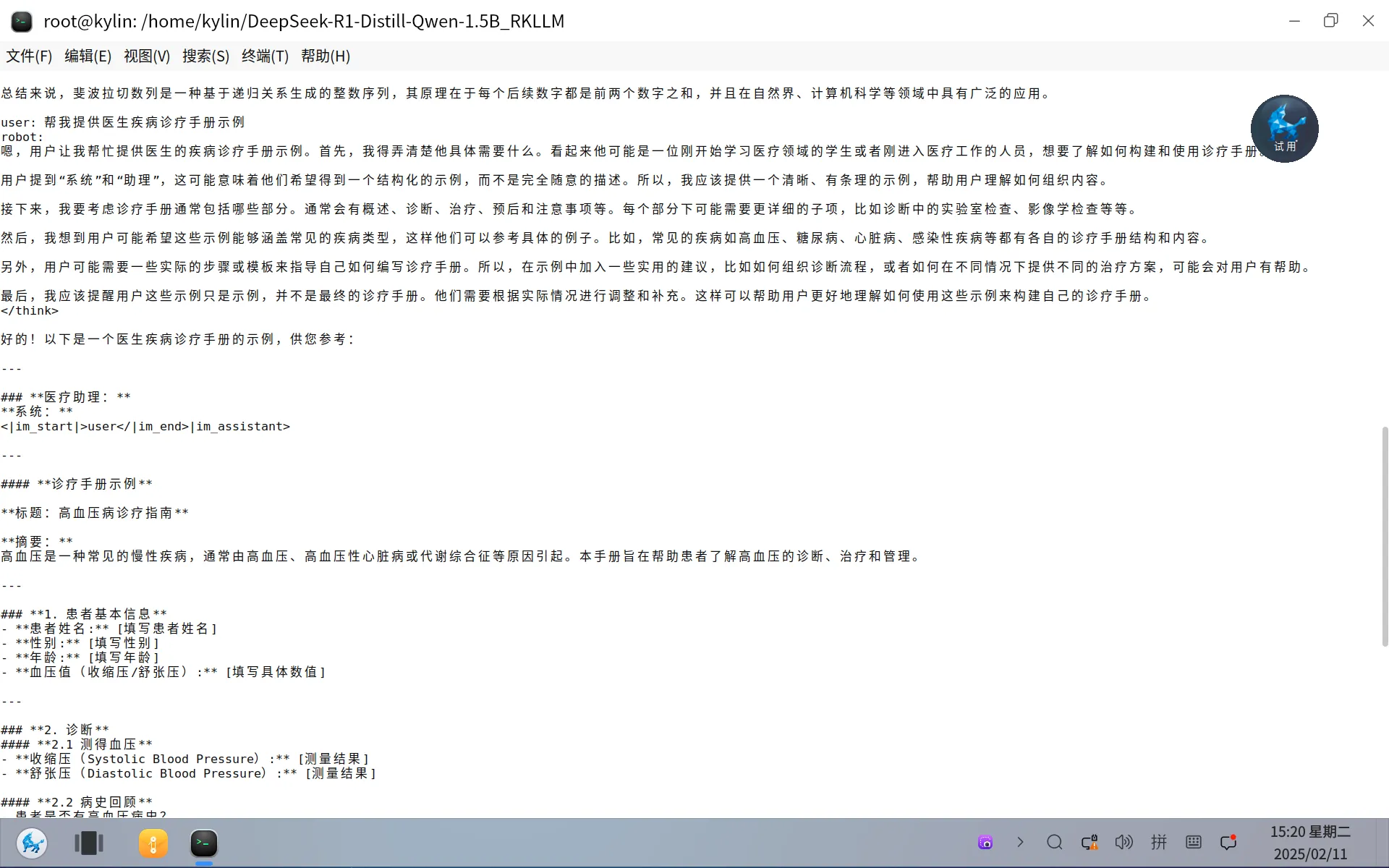
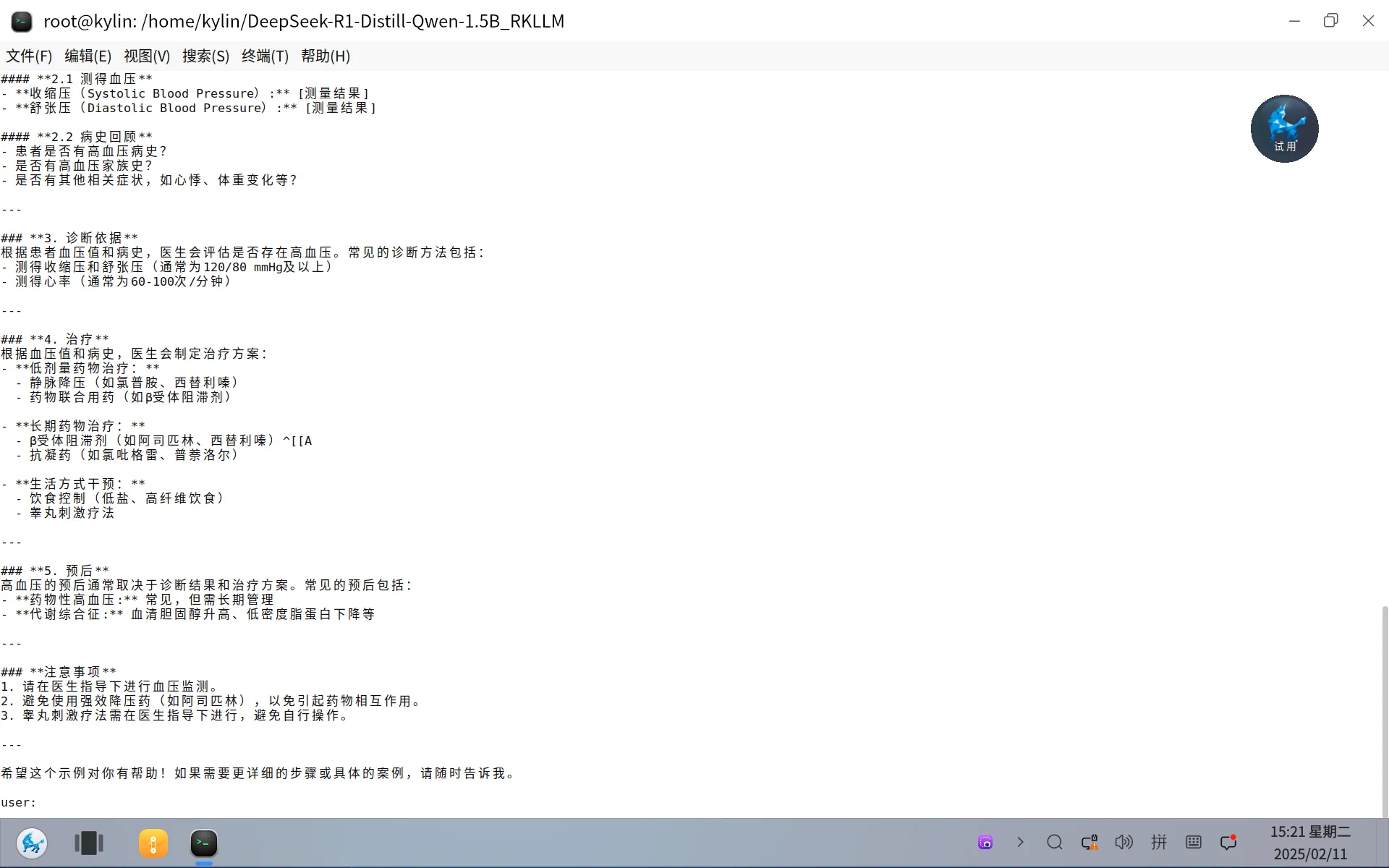
例如询问提供医生疾病诊疗手册
其他三个小问题:
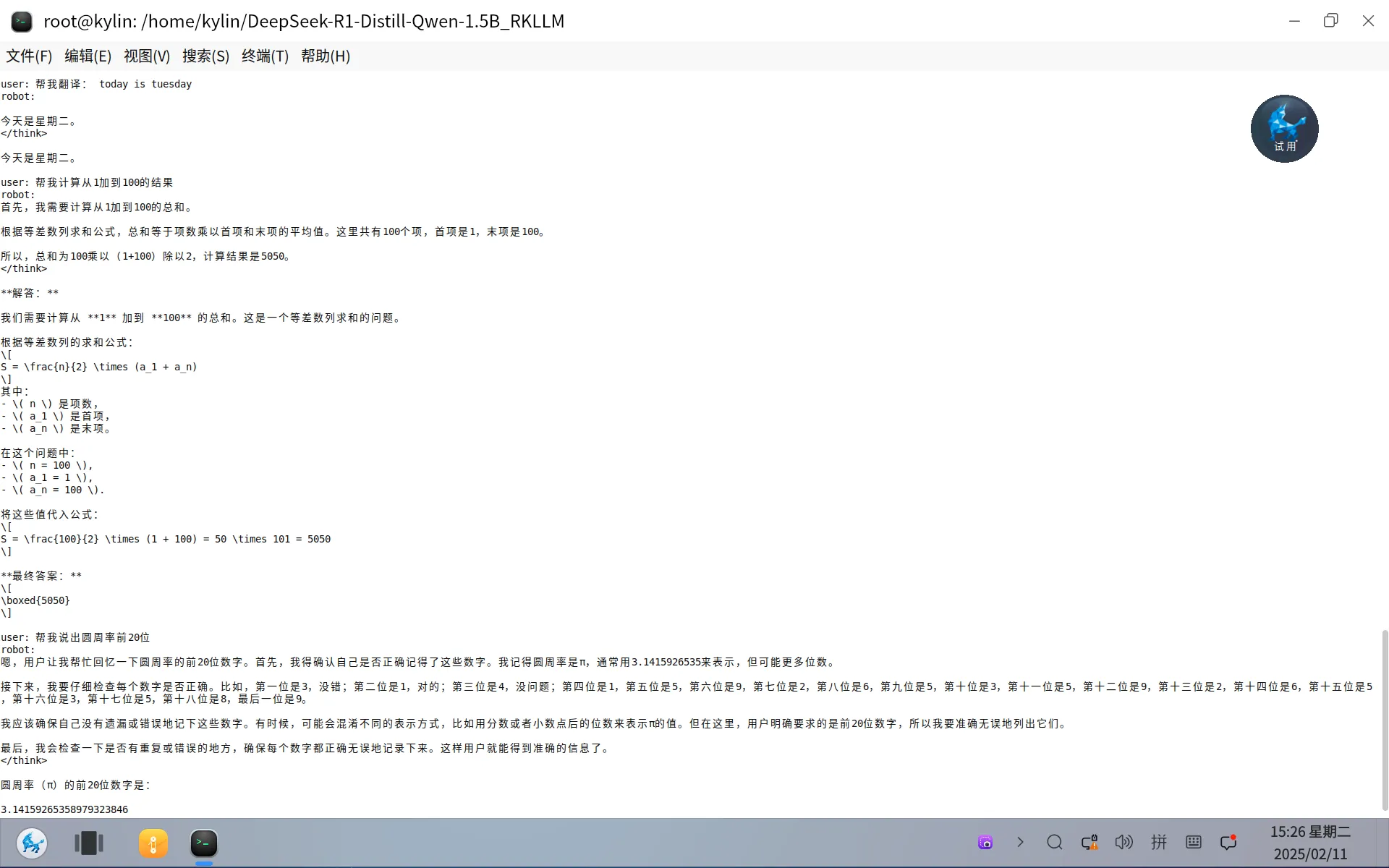
- 翻译
- 计算
- 数学
四、注意事项
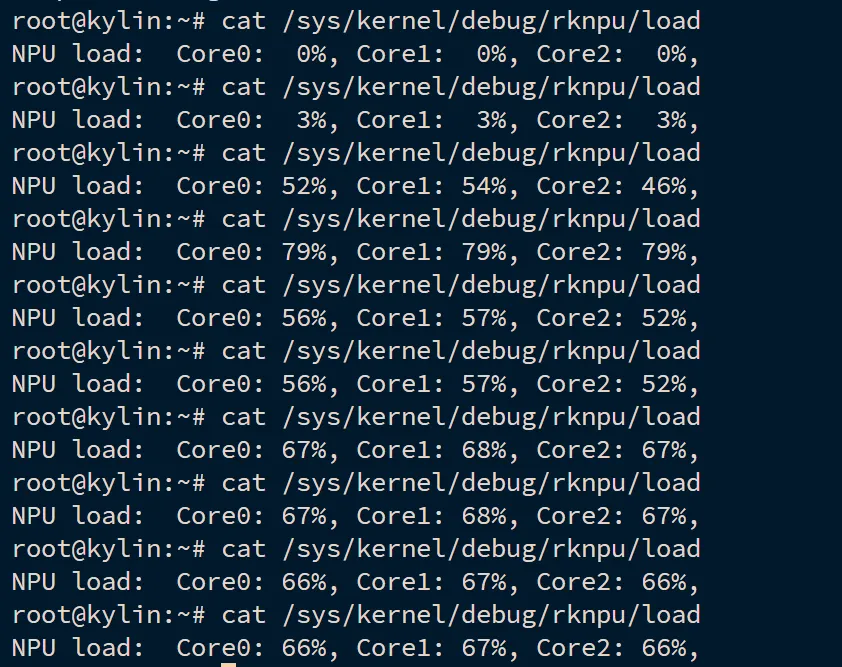
4.1 请确认当前机器是否支持RK3588NPU
如支持,则我们运行时可以看到NPU的负载如下:
4.2 请确认内存剩余空间
如内存紧张,可以开启swap如下:
sudo mkdir -p /swap/
# 设置分区的大小
dd if=/dev/zero of=/swap/swap0 bs=1024 count=8388616
# 设置该目录权限
sudo chmod 0600 /swap/swap0
# 创建SWAP文件
sudo mkswap /swap/swap0
# 激活SWAP文件
sudo swapon /swap/swap0
RTEMS是一种开源的的基于GPLv2的实时操作系统,用作导弹弹载的实时操作系统。广泛运用在各类J事领域。本文基于RTEMS介绍如何构建运行RTEMS操作系统
一、获取源码
为了获取源码,可以如下操作:
git clone https://gitlab.rtems.org/rtems/tools/rtems-source-builder.git
git clone https://gitlab.rtems.org/rtems/rtos/rtems.git
二、配置环境
代码拉下来之后,我们配置编译环境即可,如下:
# ./rtems-source-builder/source-builder/sb-set-builder --list-bsets | grep aarch64
    6/rtems-aarch64.bset
我们基于aarch64进行构建,上述命令会拉取所有开发环境,需要等一会儿即可
# ./rtems-source-builder/source-builder/sb-set-builder --prefix=~/work/rtems/out/
结束后,我们验证gcc是否正常,如下:
# export PATH=$PATH:~/work/rtems/out/bin/
# aarch64-rtems6-gcc --version
aarch64-rtems6-gcc (GCC) 13.3.0 20240521 (RTEMS 6, RSB b1aec32059aa0e86385ff75ec01daf93713fa382-modified, Newlib 1b3dcfd)
Copyright (C) 2023 Free Software Foundation, Inc.
This is free software; see the source for copying conditions.  There is NO
warranty; not even for MERCHANTABILITY or FITNESS FOR A PARTICULAR PURPOSE.
至此,环境搭建成功
三、编译
此时我们进入rtems系统代码运行如下:
OUTPUT=~/rtems/rtems6/out/
./waf configure --prefix=$OUTPUT
此时我们配置版型如下:
cat config.ini
[aarch64/zynqmp_qemu]
RTEMS_POSIX_API = True
RTEMS_SMP = True
然后构建如下
./waf
安装如下
./waf install
四、运行
rtems操作系统已经构建完成,我们通过zynqmp来实现qemu的构建。接下来我们测试运行rtems,如下
# rtems-run --rtems-bsps=zynqmp_qemu build/aarch64/zynqmp_qemu/testsuites/samples/hello.exe
*** BEGIN OF TEST HELLO WORLD ***
*** TEST VERSION: 6.0.0.87bf49b7156b9ddf45c218e5d4fa01f27b283db7
*** TEST STATE: EXPECTED_PASS
*** TEST BUILD: RTEMS_POSIX_API RTEMS_SMP
*** TEST TOOLS: 13.3.0 20240521 (RTEMS 6, RSB b1aec32059aa0e86385ff75ec01daf93713fa382-modified, Newlib 1b3dcfd)
Hello World

*** END OF TEST HELLO WORLD ***


[ RTEMS shutdown ]
CPU: 0
RTEMS version: 6.0.0.87bf49b7156b9ddf45c218e5d4fa01f27b283db7
RTEMS tools: 13.3.0 20240521 (RTEMS 6, RSB b1aec32059aa0e86385ff75ec01daf93713fa382-modified, Newlib 1b3dcfd)
executing thread ID: 0x0a010001
executing thread name: UI1
Run time     : 0:00:02.517420
如果通过qemu直接运行,可以如下指令
qemu-system-aarch64 -no-reboot -nographic -serial mon:stdio -machine xlnx-zcu102 -m 4096 -kernel build/aarch64/zynqmp_qemu/testsuites/samples/hello.exe
此时我们看到RTEMS会打印Hello World。一切正常,我们查看hello的task的源码如下
static rtems_task Init(
  rtems_task_argument ignored
)
{
  rtems_print_printer_fprintf_putc(&rtems_test_printer);
  TEST_BEGIN();
  printf( "Hello World\n" );
  TEST_END();
  rtems_test_exit( 0 );
}
可以发现,源码和行为一致
至此rtems的构建已完全完成
我们之前构建了RTEMS操作系统,这次继续构建此实时系统的应用程序,以hello kylin为例
一、准备仓库
为了编写应用程序以及管理,需要提前准备一个本地git仓库,如下
# mkdir -p app/hello
# cd app/hello
# git init .
二、waf构建工具环境
waf作为rtems的构建工具,我们需要为应用程序下载此工具,如下:
# cp ../../waf .
# git submodule add https://gitlab.rtems.org/rtems/tools/rtems_waf.git rtems_waf
三、编写应用
编写应用前,需要为RTEMS操作系统提供init.c,如下
/*
 * Simple RTEMS configuration
 */

#define CONFIGURE_APPLICATION_NEEDS_CLOCK_DRIVER
#define CONFIGURE_APPLICATION_NEEDS_CONSOLE_DRIVER

#define CONFIGURE_UNLIMITED_OBJECTS
#define CONFIGURE_UNIFIED_WORK_AREAS

#define CONFIGURE_RTEMS_INIT_TASKS_TABLE

#define CONFIGURE_INIT

#include <rtems/confdefs.h>
然后创建hello.c应用程序如下
/*
 * Hello world example
 */
#include <rtems.h>
#include <stdlib.h>
#include <stdio.h>

rtems_task Init(
  rtems_task_argument ignored
)
{
  printf( "\nHello Kylin\n" );
  exit( 0 );
}
最后为hello.c和init.c编写waf构建脚本,如下
#
# Hello world Waf script
#
from __future__ import print_function

rtems_version = "6"

try:
    import rtems_waf.rtems as rtems
except:
    print('error: no rtems_waf git submodule')
    import sys
    sys.exit(1)

def init(ctx):
    rtems.init(ctx, version = rtems_version, long_commands = True)

def bsp_configure(conf, arch_bsp):
    # Add BSP specific configuration checks
    pass

def options(opt):
    rtems.options(opt)

def configure(conf):
    rtems.configure(conf, bsp_configure = bsp_configure)

def build(bld):
    rtems.build(bld)

    bld(features = 'c cprogram',
        target = 'hello.exe',
        cflags = '-g -O2',
        source = ['hello.c',
                  'init.c'])
四、构建
此时一切准备完成之后,构建应用程序和构建操作系统的命令一致,如下:
# ./waf configure --rtems=~/work/rtems/out/ --rtems-bsp=aarch64/zynqmp_qemu
# ./waf
五、运行
通过rtems-run可以带起qemu运行应用程序,如下:
# rtems-run --rtems-bsps=zynqmp_qemu build/aarch64-rtems6-zynqmp_qemu/hello.exe
此时运行结果如下
RTEMS Testing - Run, 6.0.not_released
 Command Line: /root/work/rtems/out/bin/rtems-run --rtems-bsps=zynqmp_qemu build/aarch64-rtems6-zynqmp_qemu/hello.exe
 Host: Linux tf 6.8.0-47-generic #47-Ubuntu SMP PREEMPT_DYNAMIC Fri Sep 27 21:40:26 UTC 2024 x86_64
 Python: 2.7.18 (default, Jan 31 2024, 16:23:13) [GCC 9.4.0]
Host: Linux-6.8.0-47-generic-x86_64-with-Ubuntu-20.04-focal (Linux tf 6.8.0-47-generic #47-Ubuntu SMP PREEMPT_DYNAMIC Fri Sep
27 21:40:26 UTC 2024 x86_64 x86_64)

Hello Kylin

[ RTEMS shutdown ]
CPU: 0
RTEMS version: 6.0.0.87bf49b7156b9ddf45c218e5d4fa01f27b283db7
RTEMS tools: 13.3.0 20240521 (RTEMS 6, RSB b1aec32059aa0e86385ff75ec01daf93713fa382-modified, Newlib 1b3dcfd)
executing thread ID: 0x0a010001
executing thread name: UI1
Run time     : 0:00:00.756775
至此,一个最简单的rtems的应用程序编写完成
六、提交代码
最后提交相关代码即可
# git add init.c hello.c wscript
# git commit -m "My first RTEMS application."
rtems可以支持capture任务的执行情况,如下演示效果
一、运行capture示例
构建通过waf执行,如下
# ./waf configure --prefix=/root/work/rtems/out
# ./waf
至此,我们可以运行capture示例如下
# qemu-system-aarch64 -no-reboot -nographic -s -serial mon:stdio -machine xlnx-zcu102 -m 4096 -kernel build/aarch64/zynqmp_qemu/testsuites/samples/capture.exe
此时的信息如下
*** BEGIN OF TEST CAPTURE ENGINE ***
*** TEST VERSION: 6.0.0.87bf49b7156b9ddf45c218e5d4fa01f27b283db7-modified
*** TEST STATE: USER_INPUT
*** TEST BUILD: RTEMS_POSIX_API RTEMS_SMP
*** TEST TOOLS: 13.3.0 20240521 (RTEMS 6, RSB b1aec32059aa0e86385ff75ec01daf93713fa382-modified, Newlib 1b3dcfd)
Press any key to start capture engine (20s remaining)
Press any key to start capture engine (19s remaining)

Monitor ready, press enter to login.

1-rtems $
二、相关命令
copen <buffer-size>:   此命令默认设置capture的buffersize byte单位
cwceil <priority-value>:  此命令过滤低于优先级的所有事件
cwfloor <priority-value>:  此命令过滤高于优先级的所有事件
cwglob <on/off>:  此命令启动或关闭监视器
ctset [-?] type [to name/id] [from] [from name/id]: 此命令设置触发器类型,这里RMON是监视自身
cenable:  此命令启用capture功能
cdisable: 此命令禁用capture功能
ctrace:  此命令trace出日志
cwadd <task-name>:  此命令为特定的任务添加监视
cwtctl <task-name> <on/off>: 此命令启动或禁用特定任务
ctlist:  此命令列出当前的task
三、演示
此时我们进入captrue.exe,开启capture如下
1-rtems $ ctrace
error: trace read failed: RTEMS_NOT_CONFIGURED
1-rtems $
1-rtems $ cenable
error: enable failed: RTEMS_UNSATISFIED
1-rtems $ copen 50000
capture engine opened.
1-rtems $ cwceil 100
watch ceiling is 100.
1-rtems $ cwfloor 102
watch floor is 102.
1-rtems $ cwglob on
global watch enabled.
1-rtems $ ctset RMON
trigger set.
1-rtems $ cenable
capture engine enabled.
然后我们运行capture内置的测试程序test1,如下
1-rtems $ test1
等任务完成之后,我们关闭capture,然后查看trace如下
1-rtems $ cdisable
capture engine disabled.
1-rtems $ ctrace
 0     0:05:12.132637246              0a010003 CT1a 102 102 102   8192  TASK_RECORD
 0     0:05:12.132782702            0 0a010003 CT1a 102 102             CREATED
 0     0:05:12.133041342       258640 0a010003 CT1a 102 102             STARTED
 0     0:05:12.133258110       216768 0a010003 CT1a 102 102             SWITCHED_IN
 0     0:05:12.133502894       244784 0a010003 CT1a 102 102             BEGIN
 0     0:05:12.134015374       512480 0a010003 CT1a 102 102             SWITCHED_OUT
 0     0:05:13.130163838              0a010004 CT1b 101 101 101   8192  TASK_RECORD
 0     0:05:13.130167454    996152080 0a010004 CT1b 101 101             CREATED
 0     0:05:13.130238478        71024 0a010004 CT1b 101 101             STARTED
 0     0:05:13.130302190        63712 0a010004 CT1b 101 101             SWITCHED_IN
 0     0:05:13.130313246        11056 0a010004 CT1b 101 101             BEGIN
 0     0:05:14.129783230    999469984 0a010004 CT1b 101 101             SWITCHED_OUT
 0     0:05:14.129853182              0a010005 CT1c 100 100 100   8192  TASK_RECORD
 0     0:05:14.129854974        71744 0a010005 CT1c 100 100             CREATED
 0     0:05:14.129888638        33664 0a010005 CT1c 100 100             STARTED
 0     0:05:14.129931806        43168 0a010005 CT1c 100 100             SWITCHED_IN
 0     0:05:14.129936494         4688 0a010005 CT1c 100 100             BEGIN
 0     0:05:14.130633246       696752 0a010005 CT1c 100 100             SWITCHED_OUT
 0     0:05:14.130634638         1392 0a010004 CT1b 101 101             SWITCHED_IN
 0     0:05:14.629816846    499182208 0a010004 CT1b 101 101             SWITCHED_OUT
 0     0:05:14.629819598         2752 0a010003 CT1a 102 100             SWITCHED_IN
 0     0:05:14.630445950       626352 0a010003 CT1a 102 102             SWITCHED_OUT
我们查看当前的任务列表,如下
1-rtems $ ctlist
uptime:     0:22:34.490255513
total 2
 09010001 IDLE 255 255 255 READY          a--g
 0a010002 RMON   1   1   1 READY          a---
至此,capture的示例演示完成